Changelog

Stay up to date with the latest changes and improvements to Lean WMS.
#order #hold

Put order on hold

https://screen.studio/share/36kXBkbr (Demo here)

🚀 What's new

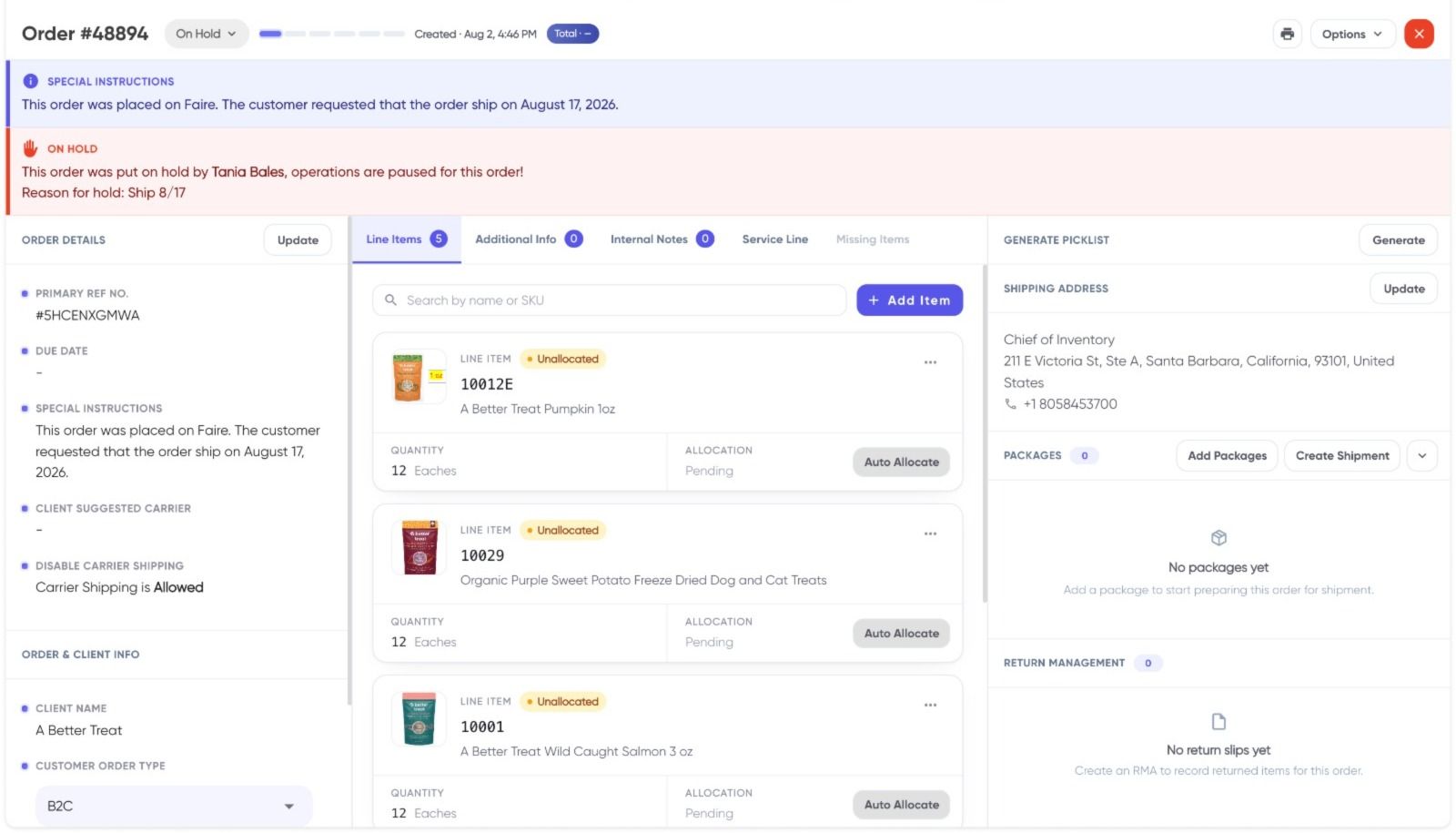
  • Introducing Order Hold — a control that lets you place specific orders on hold so they are intentionally not moved forward in the fulfillment process.
  • When an order is on hold, no inventory is allocated to it until the hold is removed.
  • Once the exception is resolved or the client confirms fulfillment, you can remove the hold and proceed with allocation and picking as usual.

🌟 Key improvements

  • Better exception handling: Easily pause fulfillment for orders where the client has requested a delay or where internal review is needed.
  • Inventory protection: Prevents stock from being reserved for orders that should not be fulfilled yet, keeping availability accurate for other active orders.
  • Operational clarity: Teams can clearly see which orders are intentionally paused, reducing confusion and back-and-forth communication.

🙌🏼 Why this matters

  • This helps operations teams respond quickly when clients ask to temporarily stop fulfillment for specific orders without manual workarounds.
  • It reduces the risk of picking or shipping orders that should have been held, improving trust and service quality.
  • By keeping inventory free until an order is ready, warehouses can plan more reliably and avoid artificial stock shortages.
#shopify #multi-store #inventory #

Shopify Multi-store Fulfillment

🚀 What's new

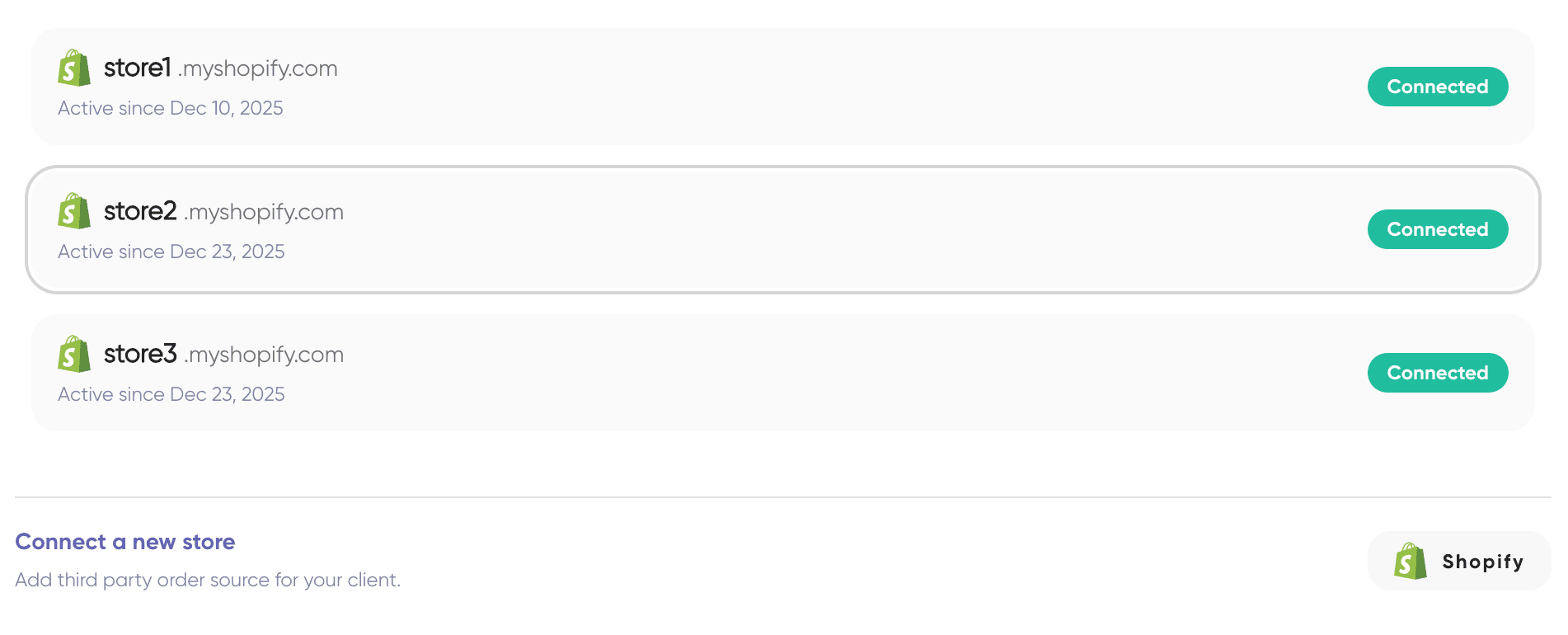
  • Introduced multi-store Shopify integration that lets you connect multiple Shopify stores to a single client in Leanafy WMS.
  • This allows customers to share the same inventory pool across different Shopify stores without creating and managing separate client accounts.
  • The capability is now built natively into Leanafy’s Shopify integration, removing the need for third-party connector workarounds.

🌟 Key improvements

  • Simpler setup: Manage all your Shopify stores for a brand under one client instead of juggling multiple client configurations.
  • Shared inventory: Maintain a unified stock view that powers all connected stores, while still keeping orders and reporting store-wise.
  • Fewer moving parts: Eliminate external connectors and custom glue logic, reducing points of failure and ongoing maintenance.

🙌🏼 Why this matters

  • Brands selling on multiple Shopify storefronts can finally run a single source of truth for inventory in Leanafy, without compromises.
  • Operations teams gain more reliable inventory accuracy and smoother omnichannel fulfillment, especially during spikes and campaigns.
  • By bringing this natively into Leanafy, the Shopify integration goes beyond generic third-party connectors and is built specifically for high-volume warehouse operations.
#dock #navigation #efficient

Introducing the Dock

🚀 What's new

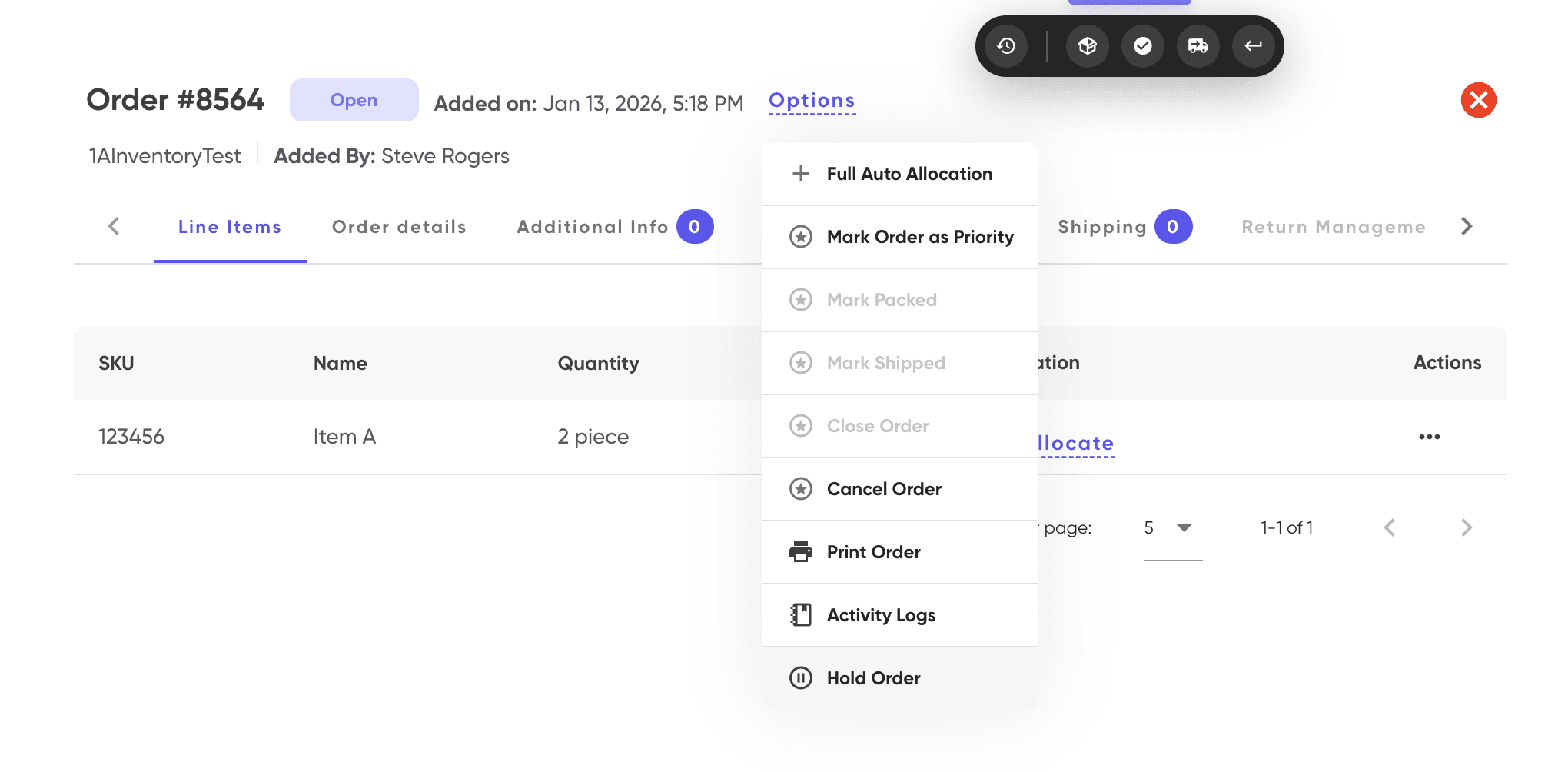
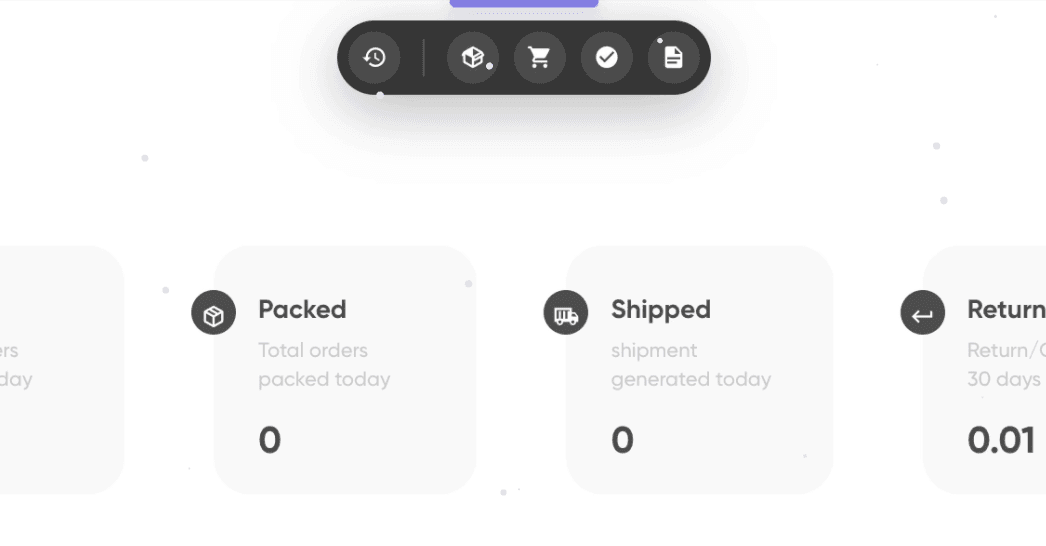
  • Introducing the Dock — a faster way to move between frequently used pages in Leanafy WMS.
  • You can dock up to 4 pages and switch between them instantly using:
    • Cmd + 1 / 2 / 3 / 4 (Mac)
    • Ctrl + 1 / 2 / 3 / 4 (Windows)
  • The dock appears at the top-center of the screen as soon as you press Cmd/Ctrl.

Note:
You can also access the dock by hovering over the blue bar at the top of the screen.

🌟 Key Improvements

  • Faster navigation: Jump between important pages without going through menus.
  • Personalized setup: Each user can configure their own dock based on how they work.
  • System-specific configuration: Docked pages are saved locally, allowing different setups on different systems across the warehouse.

🙌🏼 Why this matters

  • This makes moving between screens quicker and more efficient during daily operations.
  • Reduces unnecessary clicks, helping users stay focused on their tasks.
  • Ideal for warehouses where different systems are used for different roles or areas.
#11.25b #integration #uniuni #shipping

UniUni is now integrated!

🚀 What's new

  • Leanafy now offers a native API integration with UniUni, a Canada-based parcel carrier, built and maintained by the Leanafy product team.
  • UniUni is fully available inside the integrated Rate Shopping module, so it will appear alongside your other connected carriers for every eligible shipment.
  • This integration is added on top of Leanafy’s existing multi-carrier network, which already supports a large number of domestic and international carriers.

🌟 Key Improvements

  • You can compare UniUni rates, services, and transit options directly against your other carriers from a single Rate Shopping screen, then book the selected service in one flow.
  • Because UniUni is connected via a native API, you benefit from streamlined label generation, tracking updates, and fewer manual steps or external tools.

🙌🏼 Why this matters

  • UniUni has positioned itself as one of the most cost-effective parcel carriers for shipping within Canada, with flat, transparent pricing and an emphasis on affordable last‑mile delivery.
  • By bringing UniUni into Leanafy’s rate shopping experience, warehouses can capture these lower shipping costs at scale, significantly improving margins on Canadian orders while maintaining reliable delivery performance.
#11.25b #UoM #Invoicing

UoM Refactoring Update

🚀 What's new

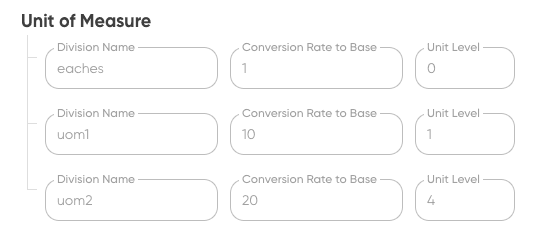
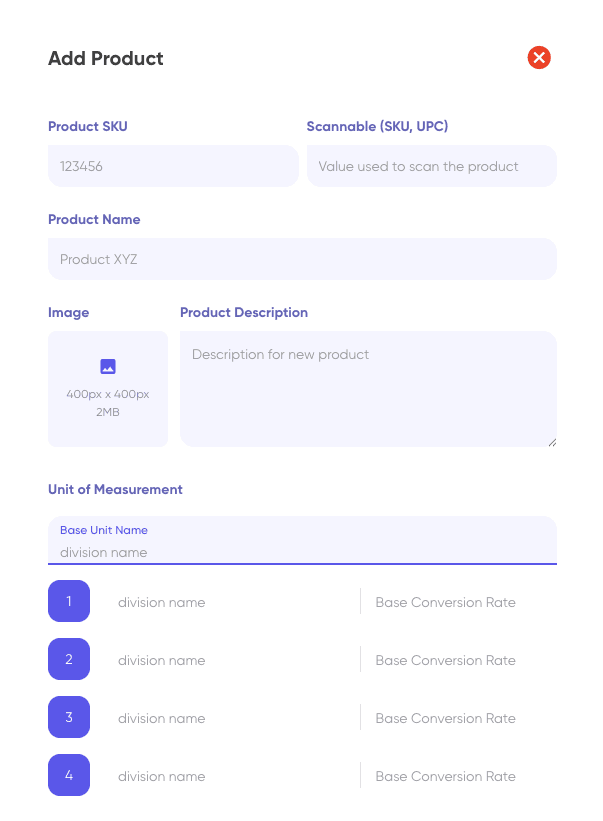
  • Unit of Measure (UoM) is now SKU specific! Instead of creating UoM groups for similar products, you can now set precise UoM details directly for each SKU during creation.
  • Standardized division names for UoMs: When adding a SKU, you select from a fixed list of division names, minimizing spelling mistakes and fragmentation. Adding custom division names is still possible but now discouraged.
  • Division Level capability: Assign levels (e.g., Level 0 for base, Level 1/2/3 for cases/cartons) so you can map service charges directly to the picked/received UoM level.

🌟 Key Improvements

  • Consolidated SKU creation: No more extra UoM class setups or redundant steps when box/carton configs vary between SKUs.
  • Elimination of manual errors: Standardized division names prevent duplicate spellings like “each,” “eaches,” etc., enabling invoice charges to be grouped accurately.
  • Smoother invoicing: Charges for picking and receiving can now be mapped directly to UoM levels, streamlining setup and billing.
  • Flexibility retained: Custom division names remain possible for rare needs, but the workflow encourages standardization.

🙌🏼 Why this matters

  • Intuitive workflow: SKU creation is faster and simpler, with no multi-step forms or confusing class/group setups.
  • Consistent and accurate invoicing: All SKUs sharing division names are treated uniformly, fixing reporting and billing issues caused by fragmented names.
  • User-proofed: Prevents typos and data inconsistencies, ensuring clean and reliable operational records.
  • Quicker onboarding: New users face fewer steps and are less likely to make mistakes, speeding up training and daily setup.
#11.25a #client_settings #API_key

🛠️ Revamped Client Settings & Self-Serve API Key Generation

🚀 What's new

  • The Client Settings page has been completely redesigned for a simpler and more intuitive experience.
  • Key settings are now decluttered and easier to find.
  • Added an easy-to-use, most requested option to delete a client directly from the UI.
  • SLA (Service Level Agreement) settings have been simplified for quicker setup.
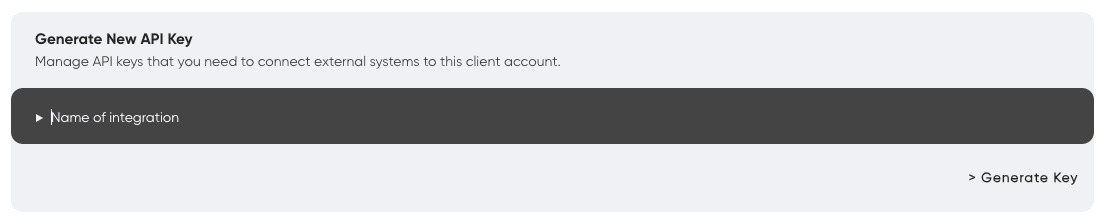
  • Warehouses can now generate their own API keys and connect any external system using our standardized APIs. Documentation and usage examples are provided here: https://docs.leanafywms.com/

🌟 Key Improvements

  • Decluttered layout: Essential settings are more accessible, and rarely used elements are hidden away until needed.
  • Client deletion: Warehouse Operators can now remove client accounts themselves in just a couple of steps—no more support tickets for this!
  • Simplified SLAs: Set and manage SLAs faster, with descriptions in plain language. And some changes on Order UI page as well to show breaches in a subtle way.
  • API Key self-service: Warehouses get instant access to generate, view, and manage keys without admin intervention, supporting open integrations.

🙌🏼 Why this matters

  • Reduces confusion and wasted time searching for important options in client settings.
  • Empowers warehouses to integrate their operations faster and more independently.
  • Eliminates delays caused by manual support processes (like key generation or client deletion).
  • Makes onboarding new systems, partners, or workflows easier with full API documentation, now accessible to every warehouse admin.
#10.25a #operations #inventory #location #hold

Hold Location improvement

🚀 What's new

  • When a location is put on hold, the system now reduces the available inventory for items stored there.
  • If needed, the system will automatically deallocate those items from orders.

Note: If you put a location on hold that's already in an active pick path and the picker is en route, the system will show an error with picklist details. You can break the path to place the location on hold.

🌟 Key Improvements

  • Automatic inventory updates: No more manual adjustments — everything is handled for you.
  • Hold = Quarantine: Placing a location on hold now works just like moving items to quarantine, but without any transfers.
  • Easy recovery: When you remove a hold, the items become available, and the system automatically reallocates them.

🙌🏼 Why this matters

  • This update removes confusion about what “hold” means in the system. Now, hold locations behave just as users expect.
  • Items in hold locations are deallocated, so pickers won’t be sent to those places during picking.
  • The pick path algorithm will skip all locations on hold — making picking easier and clearer for everyone.
#9.25b #enhancement #invoicing #3PL #service-line

Active Service Line Detailed View

🚀 What's New

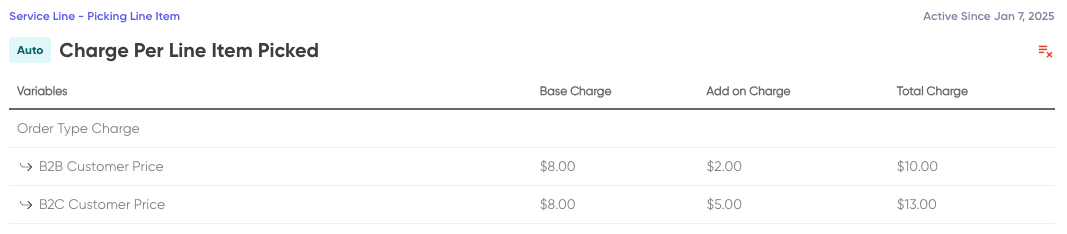
Previously, when you set up a new service line, you only saw a boring table with just names of active lines 😴

Now, you get a new and easy-to-read table that shows you all the details – what we're tracking and what each thing costs including variables and tiering! 👀💸

⭐ Key Improvements

  • See every variable, every price, and every tier at a glance.
  • Makes it simple to know what you are charging your clients and how those charges will be applied.
  • You can print this service line document and share it with your clients directly for better transparency.
  • At the end of the month, invoices are clearer and you can see exactly what happened.
  • Cost tracking and billing is now super clear and easy for everyone!

🙌🏼 Why This Matters

This feature makes managing service lines much easier and helps warehouse invoicing team understand exactly what they are charging to the clients and if it matches their contract for warehouse usage.

#9.25b #enhancement #shopify #inventory

Shopify Bulk Inventory sync

🚀 What's New

Major performance upgrade to inventory synchronization system through migration from REST API to Shopify's new GraphQL APIs.

⭐ Key Improvements

Massive Performance Improvement

  • From 40 SKUs/minute to 2000+ SKUs per call
  • ~50x faster inventory synchronization

Better Scalability

  • Supports high-volume merchants with large catalogs
  • Leverages client's Shopify plan capabilities

Improved Efficiency

  • Reduced API call overhead
  • More reliable bulk operations
  • Better resource utilization

🙌🏼 Why This Matters

This update significantly improves inventory sync performance for larger merchants, enabling near real-time inventory updates across thousands of SKUs without hitting rate limits. Particularly beneficial for merchants with extensive product catalogs on higher-tier Shopify plans.

#9.25a #feature #returns #rma

Return Handling - New & Improved

🚀 What's New

  • The RMA form now lets you add non-order items to returns when the wrong SKU is shipped.
  • You can return any quantity you want, not just what was shipped.
  • RMAs can be created using a shipment's tracking number or its return tracking number.

⭐ Key Improvements

  • Track accepted and rejected quantities when receiving returns.
  • Warehouse operators can mark quantities as rejected and upload photos if needed.
  • Introduced a “Posted Returns” report showing what was expected vs. what was actually returned.
  • Improved RMA view: see expected, accepted, and rejected quantities at the item level, and make receiving entries directly from central.

🙌🏼 Why This Matters

These changes make returns much more flexible for warehouse teams, making it easy to process mistakes, adjust quantities, track reasons for rejection, and keep a clear record of what came back and why. Your team can now handle tricky returns and keep warehouse operations transparent and organized!

#9.25b #invoicing #clients #custom-date

Adhoc Invoicing

🚀 What's New

  • You can now generate invoices between any two custom dates—no longer limited to month-to-month invoicing.

⭐ Key Improvements

  • Select a client and choose custom start and end dates for your invoice.
  • The system suggests the next start date based on the end date of the last invoice for that client.
  • Regenerate an invoice directly from the detailed invoice panel with just a click.
  • Preview any invoice before finalizing—these "preview invoices" are dummy invoices to help you validate transactions and check total cost before billing the customer.

🙌🏼 Why This Matters

Now, customers who want to bill for services whenever they want can use this feature. No need to wait for the end of the month—just create and get paid any time you choose! This brings more flexibility and control to your billing process.